







1-2-1 – Types and new access levels
Over the past few weeks, we've made some long-awaited updates to 1-2-1, focusing on greater flexibility around who can initiate conversations, who can participate, and who has access to what.
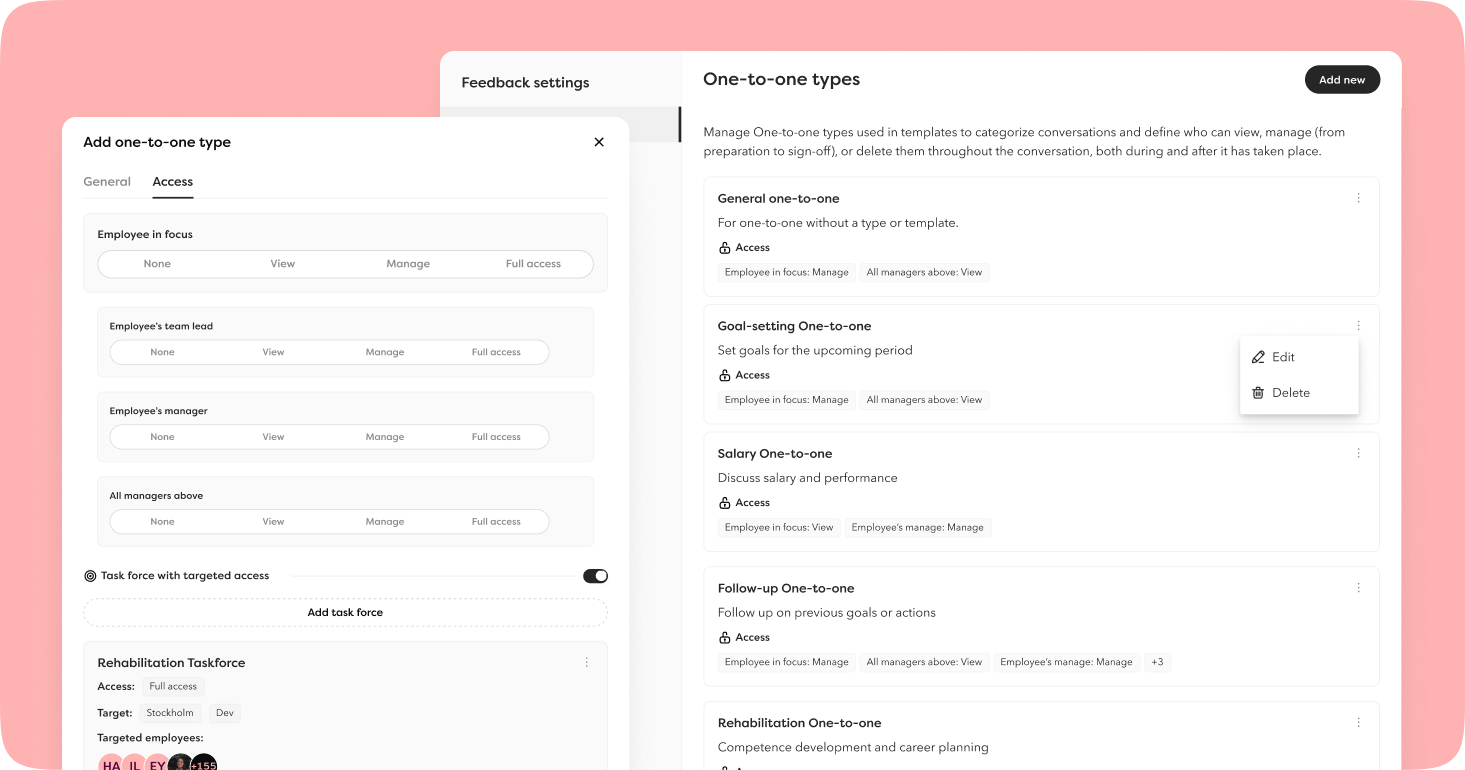
The biggest news is 1-2-1 types. You can now categorise your 1-2-1s into types that you define yourselves – for example, salary reviews, annual development meetings, exit interviews, or rehabilitation discussions.
The 1-2-1 type then controls the access level (previously managed under roles and rights), meaning you can determine exactly who should have access to which type. Salary reviews might be handled by the line manager, rehabilitation discussions by HR, and spontaneous check-ins by the employee themselves.
Tasks and completion
- Preparatory questions can be saved as drafts, keeping the task on the dashboard until it's completed. Responses are saved automatically every ten seconds, so no information is lost.
- Once all preparatory questions have been submitted, the conversation status updates to Preparatory questions answered and the task is removed from the dashboard.
- Employees can initiate and conduct their own meetings by granting them the Manage access level for selected 1-2-1 types.
- You can now complete a conversation without requesting approval.
Notifications in Teams and Slack
Tasks are now sent via Teams and Slack bots to both the employee and their colleague – including reminders to answer preparatory questions and the ability to approve conversations directly from the bot.
Overview and filtering
- The 1-2-1 list in the HR hub can now be filtered by 1-2-1 type, making it easy to see, for example, how many employees have completed their annual development meeting.
- Tasks related to answering preparatory questions and approving 1-2-1s are displayed in the task list in the HR hub.
Coming soon! Admins will get an email when this is live in the platform.
🚨 HSE deviations – report and manage
New feature! Employees can now report HSE deveiations, giving you everything you need to manage and follow up on them. All documentation is gathered in one place, making it easy for those who report to track progress and see whether action has been taken. Every incident is an opportunity to learn and create a safer workplace.
Reporting is done via the mobile app, and management is handled on desktop.
Reporting incidents from the mobile app
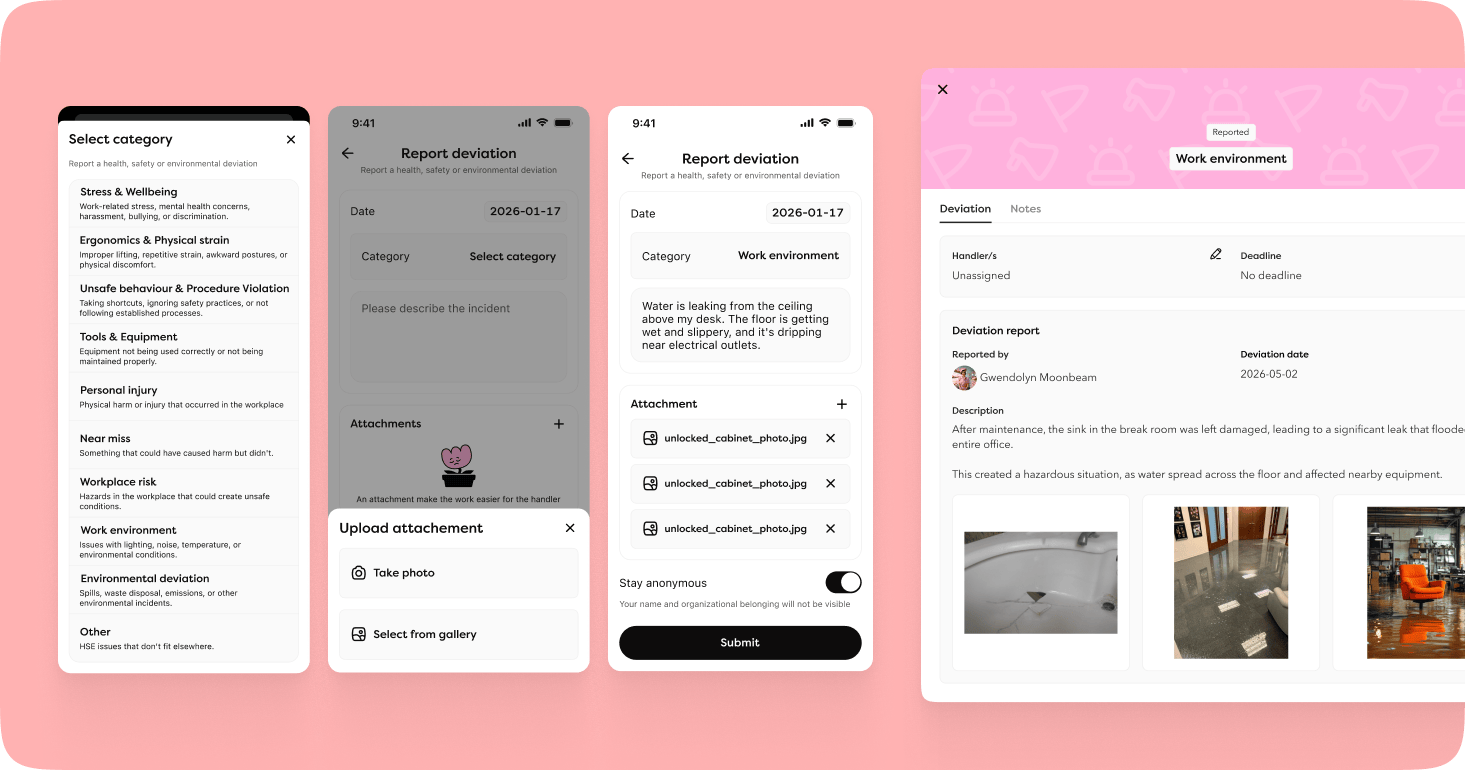
Employees can report incidents quickly and easily via the mobile app. They select a category, describe what happened, enter the date, and can attach a photo – either taken directly in the app or selected from their photo library. To encourage open reporting, there is also an option to report anonymously, meaning the case handler will not see who submitted it.
Full control for case handlers
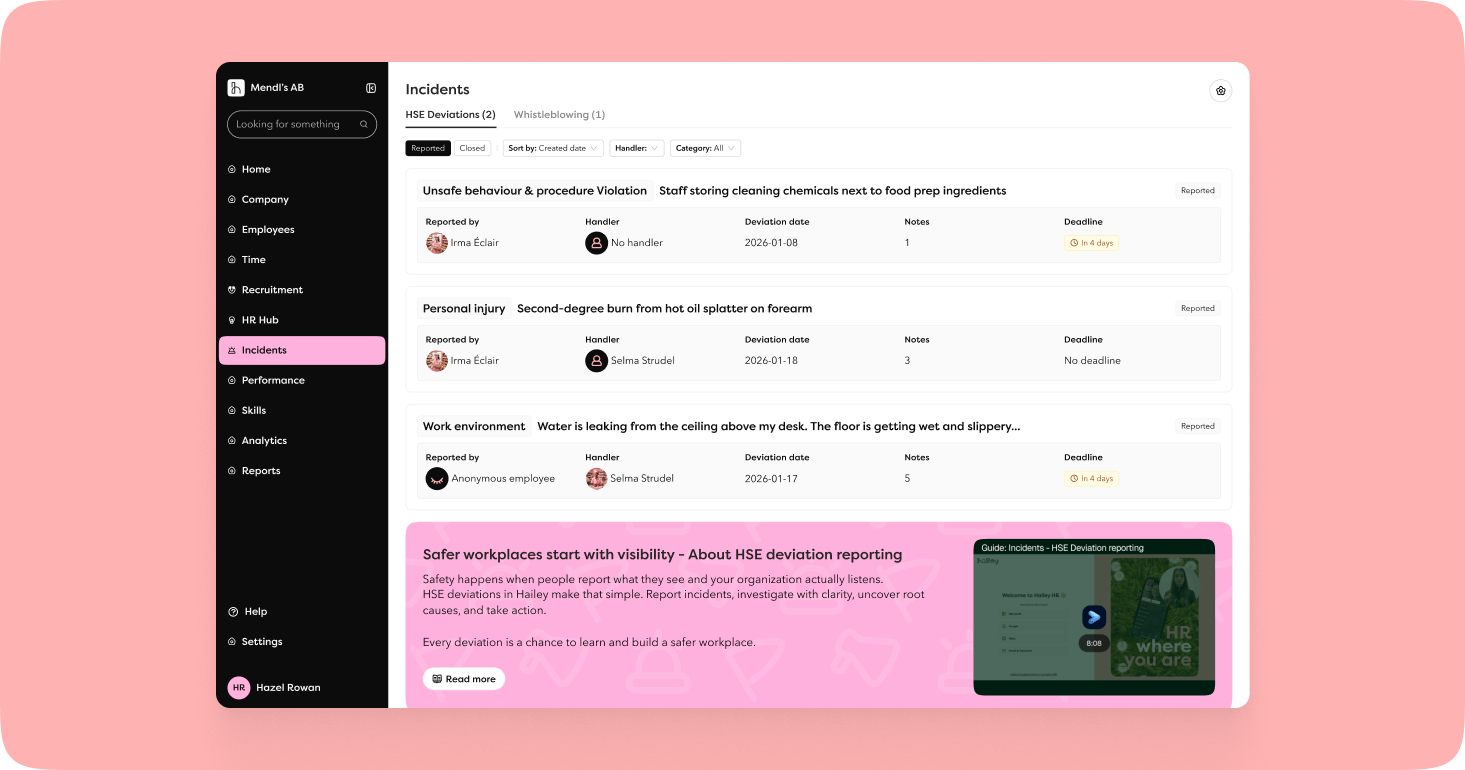
Once an incident has been reported, those responsible have all the tools needed to work in a structured way:
- Set up e-mail notifications per category, so the right person always knows when an incident in their area of responsibility is reported.
- Assign a handler – clarify ownership and prevent responsibility from falling through the cracks.
- Set a deadline – helps the team prioritise and keep track of how long a case should take to resolve.
- Documentation – log actions and follow-up notes throughout the lifecycle of the case.
- Close the case – once the incident has been resolved, it is closed with a final comment sent back to the person who reported it.
Keeping the employee informed
The person who reported an incident receives a status card in the app showing real-time updates:
- Reported – The incident has been received.
- Being handled – A case handler has been assigned.
- Closed – The case is resolved, and the handler's comment is displayed. The card remains visible for 30 days.
Rights and settings
The feature is activated in Settings under Incidents in the main menu, and rights are granted via roles and rights to members of manager roles, company roles, and administrators.
Whistleblowing has a new home
Whistleblowing reports can now be found under the new Incidents tab in the menu – a single, unified location for all types of incident reporting.
Pay transparency directive
New legal requirements can feel overwhelming, and we want to be by your side every step of the way. Our goal is for you to feel confident and prepared when the time comes – with everything you need built into Hailey. Here are some of the latest updates to help you on your way:
Salary communicated during recruitment
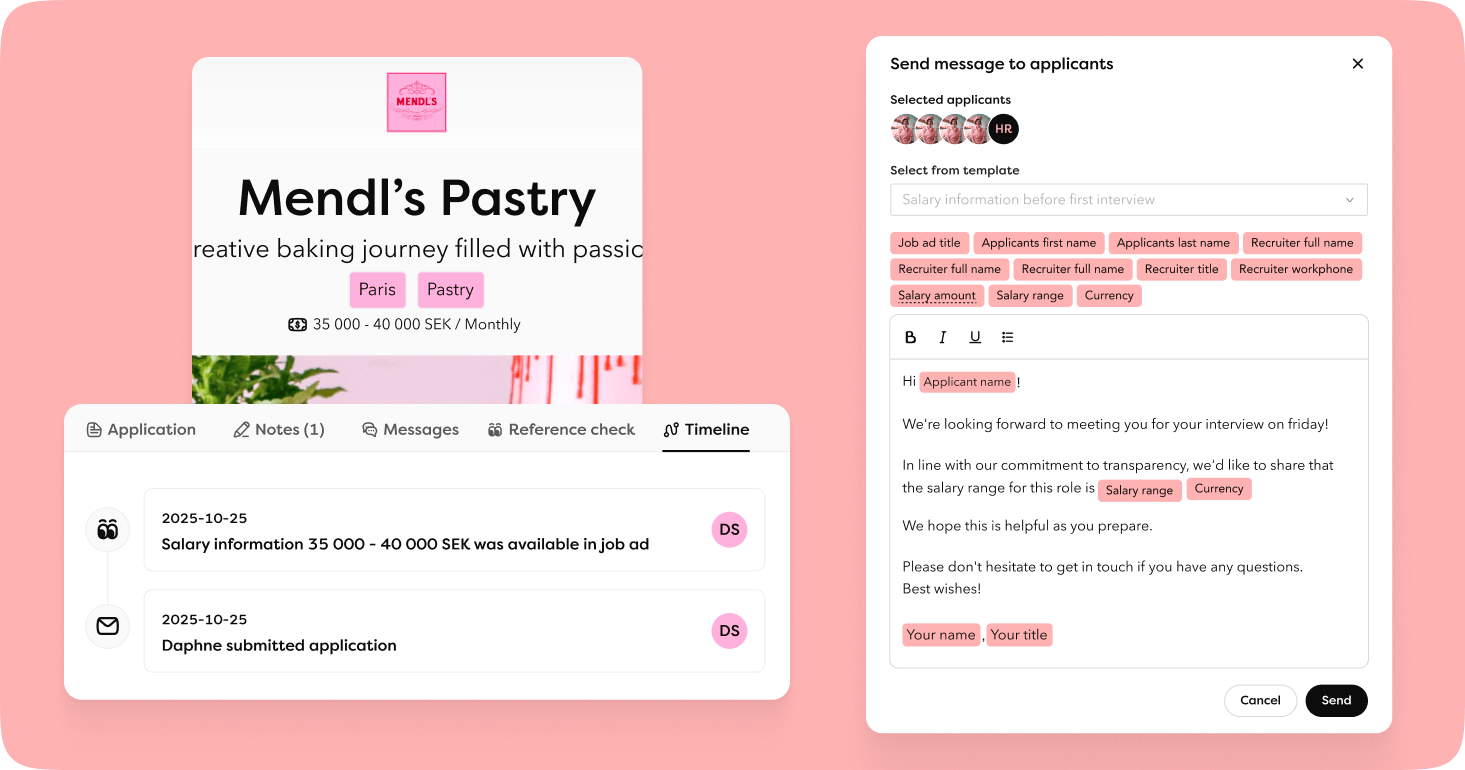
The Pay Transparency Directive requires that candidates receive information about the initial salary or salary range well in advance of any pay negotiation. When starting a recruitment process, you can now specify a salary range or initial salary. We've made it straightforward to communicate this – and to document when and how it was done.
There are three ways to communicate salary to candidates:
- In the job advert – Choose to display the initial salary or salary range for the role directly in the advert to set clear expectations from the outset. When salary is communicated via the advert, it is automatically logged in the candidate's timeline in the application view.
- Via chat – Send salary information directly to one or more candidates via messages. New merge tags for salary information are available in message templates. The message is saved in the application view for clear documentation.
- Via notes – If the salary has been communicated verbally, for example by phone, it can be documented in the notes field on the candidate's record in the application view.
Benefits
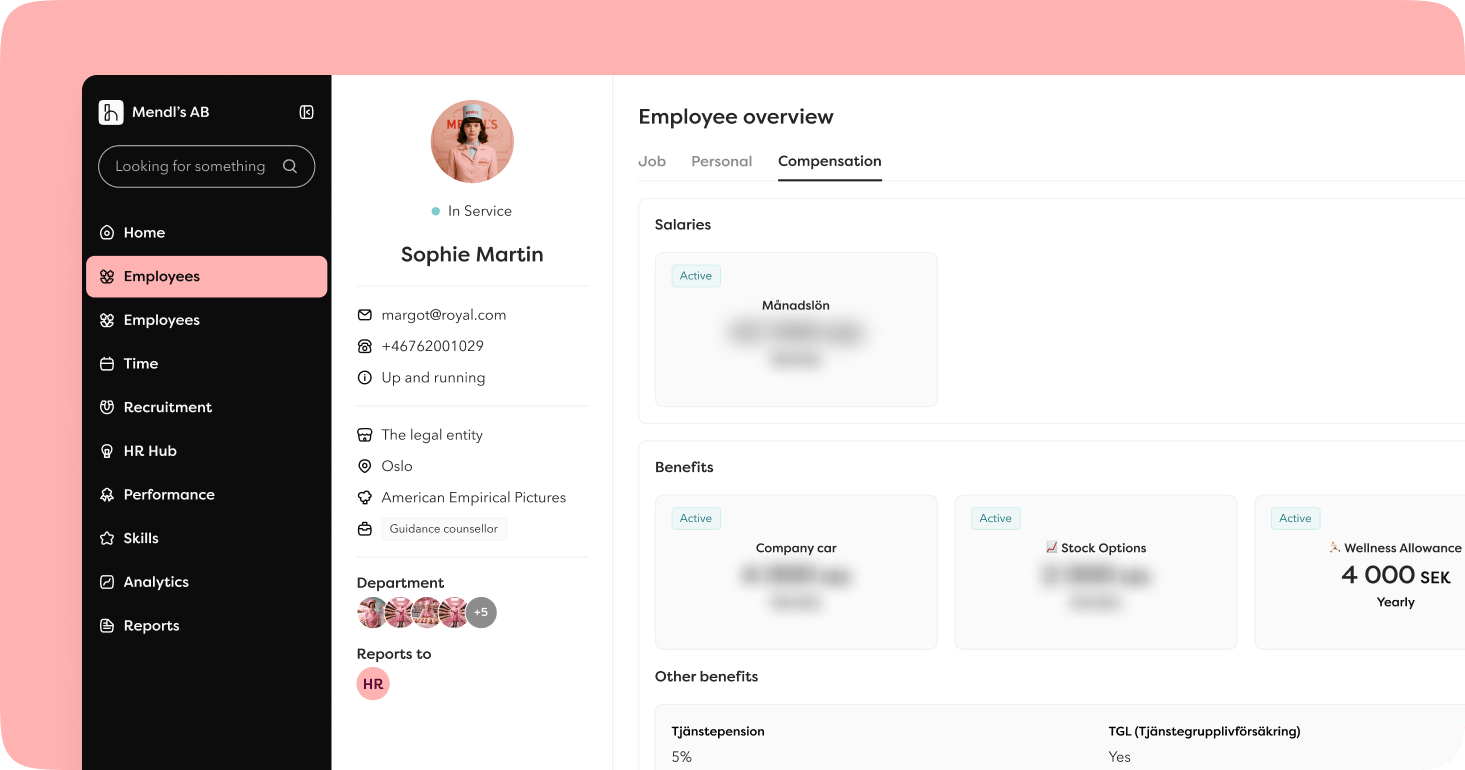
The Pay Transparency Directive requires that benefits are included in the overall pay picture. To meet this requirement, you can now manage benefits in a structured and transparent way, consolidating total compensation within the platform. A future step will see benefits included as part of pay equity reviews and pay gap reporting.
Manage benefits in Settings
Administrators can now create, update, and delete benefits directly in Settings. Each benefit is configured with a name, description, frequency (monthly or annual value), and scope. To maintain data integrity, a benefit that has been assigned to an employee cannot be deleted.
Assign benefits to employees
Users with the Edit benefits permission can now assign benefits to individual employees via the action button, based on the benefit types configured by an administrator in Settings. No approval process is required.
Import benefits
Administrators can import benefits to all employees at once.
Benefits report
New report! Select a date to list all active benefits at that point in time, including the amount and how long that amount has been in effect. Please note that the dates refer to the validity period of the specific amount, not the overall duration of the benefit.
The report can, like other reports, be shared with selected users.
New compensation tab in Settings
Alongside the benefits updates, we've added a new tab in Settings – Compensation – where both benefits and salary types are now managed together.
Pulse surveys – extended access and sharing with managers
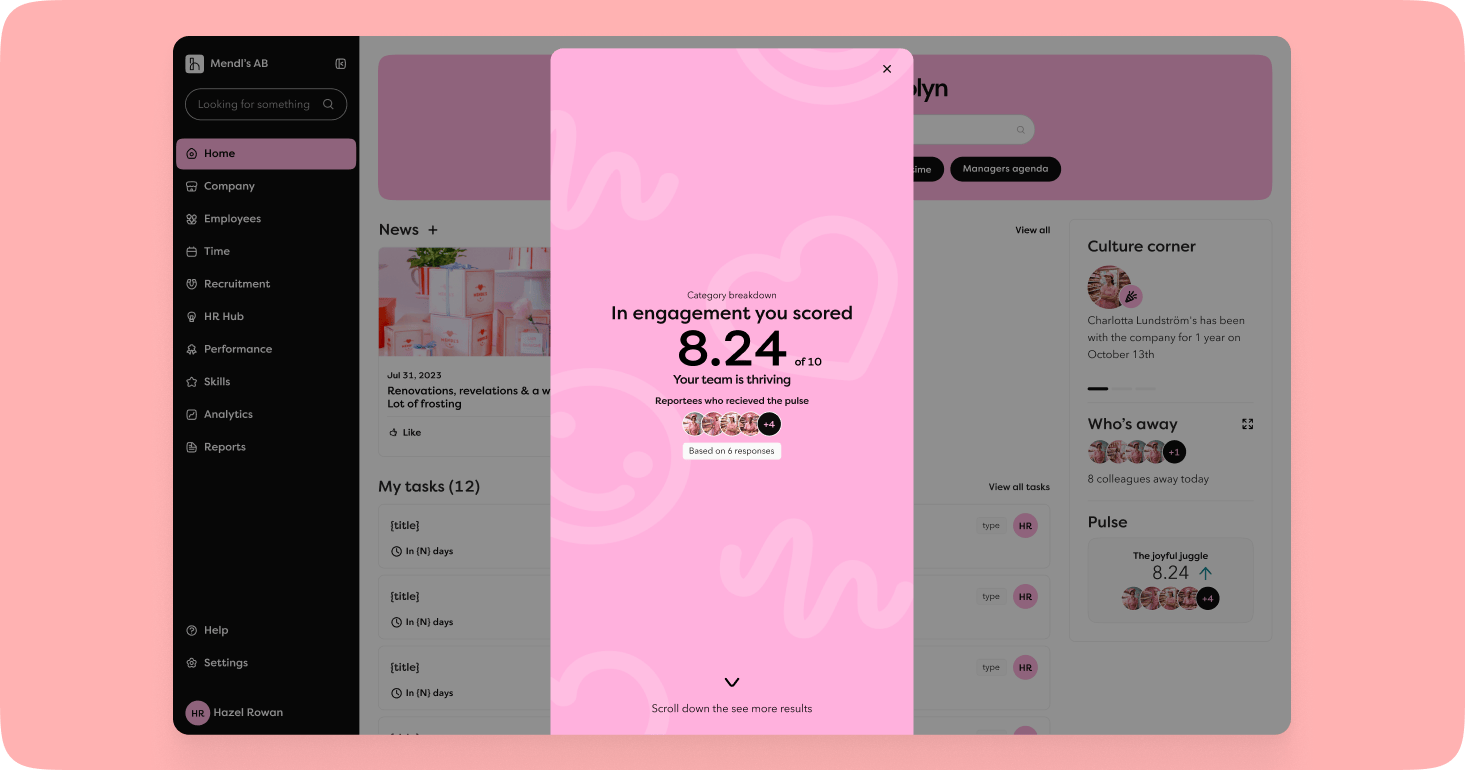
We've made pulse surveys more powerful with better control over who is included in distributions and the ability to share results directly with managers.
More targeted distributions
When creating or updating a pulse survey, you can now:
- Filter by employment type – exclude consultants and interns, for example, to ensure the right audience receives the survey.
- Exclude employees on long-term leave – avoid sending surveys to employees who are not currently in work.
Share pulse surveys with managers 🩷
Perhaps the most significant addition: results can now be shared directly with managers. This gives managers a view of their team's pulse survey results on their dashboard – without having to wait for reports from HR – enabling them to act more quickly on signals from their team.
To ensure statistical relevance, a manager must have at least five direct reports for results to be displayed on their dashboard.
Rights to manage all pulse surveys
A new right has been added to company roles. Users with this permission gain full access to everything under Pulse Surveys.
Sharing time off insights
Time off analysis makes it easier to identify patterns and share important insights with managers and decision-makers – without any sensitive data ever leaving the platform.
Our analytics tool is both well-used and well-regarded. However, through conversations with customers, we've identified two recurring challenges:
- It's difficult to spot patterns in time off data.
- It's difficult to share insights internally within the organisation.
You can now set up your analytics dashboard with five new metrics:
Proportion of employees with time off - The percentage of all employees who have had time off during a selected period.
Number of employees with time off - The actual number of employees who have had time off during the period – a simple but powerful key figure.
Average time off hours per employee - Total time off hours during the period divided by the total number of employees. Gives a fair picture of time off levels regardless of team size.
Time off by manager - A combined table showing three metrics in one view, sorted by manager. Makes it easy to see which manager's team accounts for the most time off and where interventions may be needed.
Proportion of working time lost to time off - How much of the company's total expected working time is accounted for by time off. An important metric for understanding the real impact of time off on the business.
Rights for initiating employment
We've expanded and refined rights around the employment process. Previously there were two rights; there are now four, providing significantly greater flexibility around who can initiate which type of employment. One example is restricting managers to only being able to initiate employments using an employee template.
- Initiate employment – start a standard employment without a template.
- Initiate employment with employee template – start a standard employment using an employee template.
- Initiate casual employment – start a casual employment without a template.
- Initiate casual employment with employee template – start a casual employment using an employee template.
Mobile updates
The mobile app has also received a round of updates.
Culture Corner on the home screen - Culture Corner is now available directly on the home screen – never miss a birthday, work anniversary, or a new colleague's first day.
Annual variable pay under Compensation - The annual variable pay is now also displayed on the employee profile under Compensation.
Updated rights - The split permissions for View employment and View casual employment now work in the mobile app in the same way as in the web app.
HSE reporting - Reporting of HSE incidents is now available in the app.
Employment number sequence
It is now possible to create multiple employment number sequences – a long-requested feature for companies with several legal entities that need to keep their numbering separate.
What is a sequence?
A sequence consists of a name, a prefix, and a starting number. You can create, edit, and delete sequences as needed. We recommend naming each sequence after the legal entity it belongs to, to keep things organised.
Please note: companies that do not need multiple sequences should not add more. Multiple sequences can otherwise result in duplicate employment numbers, which may directly affect integrations, for example.
What happens to existing accounts?
All accounts are migrated automatically and will receive a default sequence called Employment number. For the vast majority, nothing changes – you won't notice the update if you only have one sequence.
For accounts that wish to add multiple sequences, a simple selection step is added to the most common workflows:
- Update employment number – choose which sequence the number should belong to. The number must be unique within the selected sequence.
- Generate employment number – select a sequence via the employee list or on the employee card.
- Import employees – the import template now includes an additional column for sequence assignment (by name).
Other updates
Company goals linked to legal entity
It is now possible to link a company goal to a legal entity.
Improved error notification for contract distribution
If a contract distribution from the employee list fails, a notification e-mail is sent – which now also lists which employees the contract could not be sent to.
Salary review – simplified view
The side menu has been removed from all salary review views to reduce the risk of users navigating away with unsaved changes.
Reminders for direct tasks
It is now possible to set reminders for direct tasks directly in the task list.
Accessibility
We continue to adapt the platform to meet the WCAG 2.2 standard. The latest addition is a new design for the account menu, making it easy to tab through all options.
Technical updates
Input restrictions
We've made a number of improvements to how data is handled and validated in Hailey – mostly technical, but with clear benefits for data quality and security.
- Size limit – All input fields are limited to a maximum of 10 MB, a generous limit that should not affect users in practice.
- Automatic whitespace trimming – Leading and trailing spaces are removed automatically, resolving a common issue during imports, for example. This does not yet apply to fields in Feedback and Survey.
- Character validation – We've defined which characters are permitted in Hailey for security purposes. Initially rolling out on the company page only, before being extended to the rest of the platform.
Hailey's open API
GET Job Ad - extended data The endpoint now returns the publication start date and publication end date, so that receiving systems can mirror the same publication dates. The endpoint also automatically returns workplace and department.
GET Competences - New endpoint in the Open API for retrieving all competencies associated with a company.
Subscribe to our product updates
Fill in your details below to receive our next product update in your inbox.