







We're starting 2026 with the annual salary review upgrade, focused on stability and clarity, ready for this year's reviews. We're also launching AI summarisation of CVs and a completely new section on employee cards that you can customise freely with your own fields. We've built a lot over the Christmas break, so take a look below to catch up on everything new!
Salary review 4.0
The salary review has been updated with improvements throughout the entire workflow, from setup to final approval.
Setup and configuration
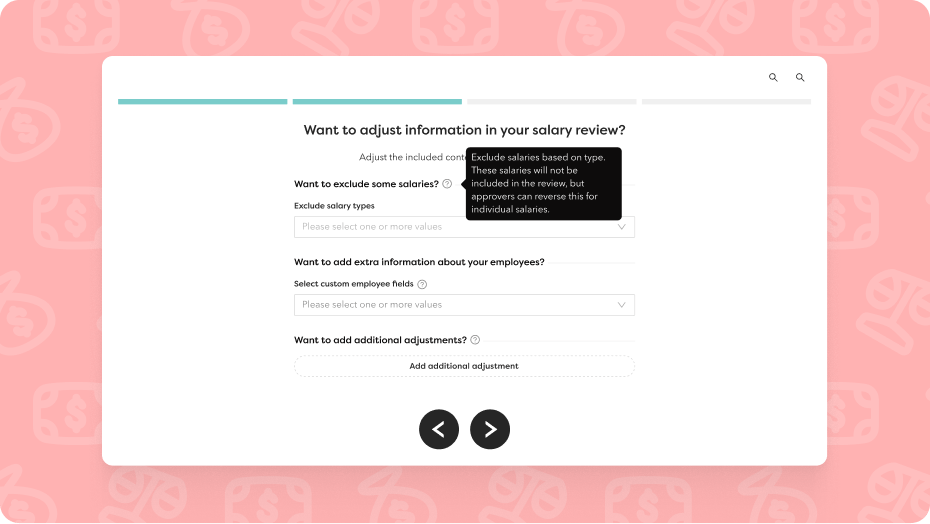
Pre-exclude salaries based on salary type
HR can now exclude certain salary types when creating a salary review. Proposers can still choose to include these salaries if needed, but it helps to define the scope from the start.
Yearly variable additions now visible
If an employee has a yearly variable addition, you'll see:
- Percentage
- Expected amount before raise
- Expected amount after raise
Note: You can't change the yearly variable addition percentage in the review itself, but you can see how the salary change affects the total amount.
Improved UX & navigation
Cleaner interface
- The menu automatically collapses when you enter a view, giving you more space to work
- The pay period column has been removed to reduce clutter
- Several columns have been tightened for better overview
Clearer view names and statuses
All views and update cards now use consistent names, and we've added status indicators so you always know where you are in the process and what remains to be done.
Clarity for proposers
- Proposers no longer receive a separate task to propose salaries
- Changes are highlighted in bold until you save or submit proposals
- New split button combines "Save as draft" and "Save and close"
- Clearer button labels in the drawer show exactly what each action does
Simplified final approver actions
All buttons in the final approval view are now grouped under a "Action" button for easier navigation.
Better visibility & tracking
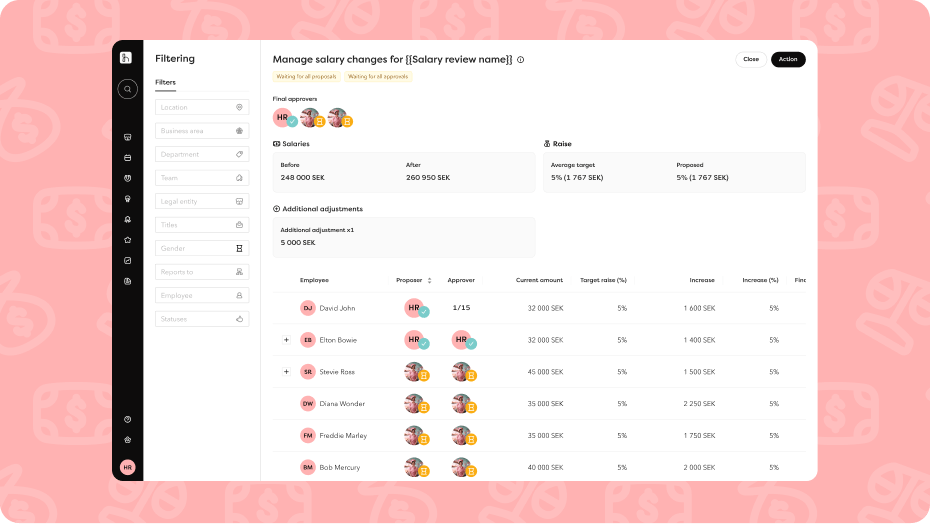
Additional adjustments now visible to everyone
Previously, only final approvers could see additional adjustments in the summary boxes. Now proposers and approvers can see them too. Note: "Salaries - After" now includes both salary review raises and additional adjustments.
Additional adjustments on summary rows
If an employee has multiple salaries and received additional adjustments, you'll see this on their summary row.
New information modals
All information modals (the information "i"s) now use clearer icons instead of emojis and show all deadlines plus the effective date for salary changes.
Export & filtering
Employment numbers in exports
All exports now include employment numbers for easier reference.
New filter: "Employees below"
Final approvers can use this filter to see all employees under a specific person in the hierarchy, not just direct reports.
Approvals & finalisation
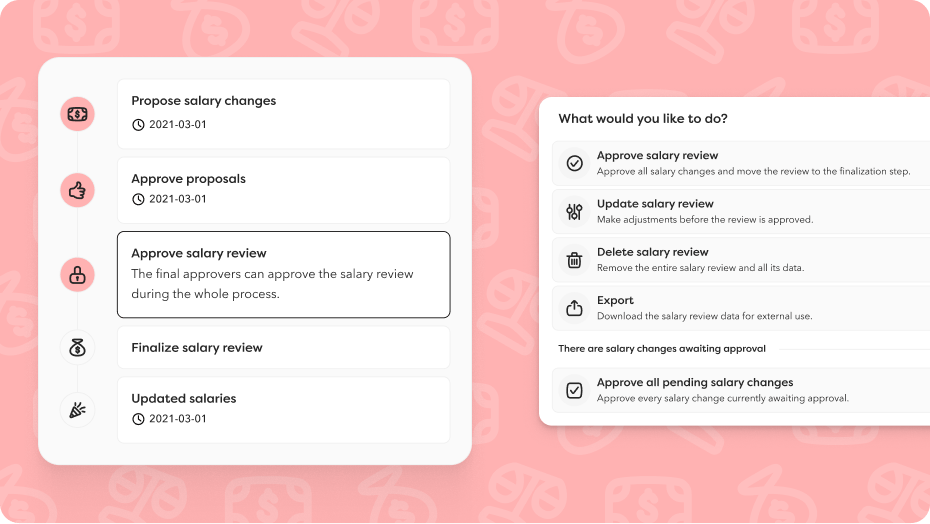
Final approvers can unblock the process
Final approvers can now approve salary changes on behalf of approvers who haven't yet given their approval. This prevents the process from getting stuck when a manager is slow to respond or on leave. This is a separate action from the final approval itself, so you can do it in stages.
Keep or override upcoming salary changes
When finalising, if employees have approved salary changes (outside the salary review) scheduled after the review's effective date, you'll be asked whether to keep or override these future changes.
After final approval
New post-approval view
Once a review is finalised, proposers and approvers receive a new view (available until the salary review's effective date) showing:
- Which employees and salaries were approved
- What will be updated on the effective date
- Same columns as before, but no drawer or interactions
- Excluded salaries and unapproved changes aren't shown
New section on employee cards gives you better structure and control
We've added a new section under the personal tab on employee cards: Other. You customise this section with your custom fields.
Better overview. Gather information that doesn't fit under other sections in one place.
More control. Control exactly who can view and edit information in the section through roles and permissions.
Flexible structure. The section only appears if you choose to use it by moving existing custom fields here or creating new ones.
The information you add here follows the same permission logic everywhere. If someone doesn't have access to the section on the employee card, they also can't see the information in the columns in the employee list.
AI summarisation of CVs in recruitment
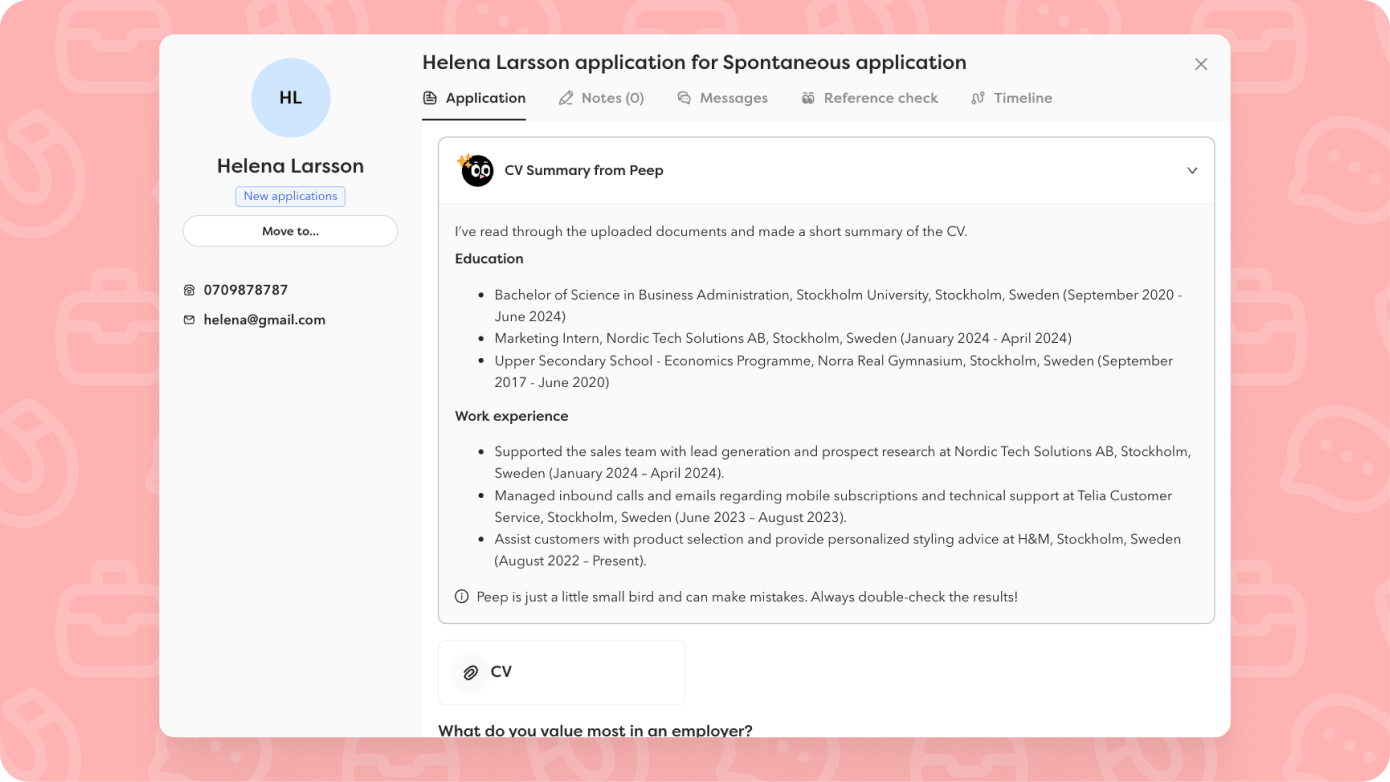
Get a faster overview of candidates! When AI is enabled for recruitment, CVs are automatically summarised. Instead of reading through each document, you get a concise summary of education and work experience (if present), making it easier to quickly evaluate and prioritise candidates in a first screening.
The summary appears within a minute and is saved on the candidate profile, even if you turn off AI. We only summarise documents from fields labelled as "CV", "Resume", or "Curriculum Vitae".
🩷 Other updates 🩷
Activate a terminated employee without the rehire workflow
You can now activate an employee who has left without running the entire rehire workflow. A shortcut, essentially. We recreate GDPR keys and stop the GDPR deletion that was previously activated in relation to the end date. Data that's already been deleted can't be restored, you'll need to fill that in again.
Coming soon
Extended access to document folders on employee cards
You can now give "unknown" users (i.e., those without a start date attached to them) access to document folders on employee cards under "Specific employee". This makes it easier to import documents via API, as the user who generated the access token needs access to the folder where the document will be uploaded, which is often an "unknown" user.
Add time off and report time via the profile
Employees can now add time off and report time directly from their own profile, not just from the dashboard. This makes it easier to see their calendar whilst registering time off or time.
Filter by employment type in custom analytics dashboards
Filter by employment type in your custom analytics dashboards. This makes it easier to segment data and create relevant views for different users with whom you share the analyses.
Save views in more reports
You can now save your favourite views in more reports:
- Joiners
- Time
- Time off
- Time off balances
- Salary changes
The feature will soon be available in reports for Leavers, Comp time, Salaries, Employments, and Overtime.
Rights for the signature list
Give the right people the right access. You can now assign the right to either view or edit the signing list in all roles (except Team lead). View grants access to the list and documents, whilst Edit also allows signature cancellation.
Decimals for scope and holiday days
More precision in calculations. We've updated the data type for scope and holiday days, providing more accurate results when you use employee templates. Scope (h) is now calculated correctly from scope (%) without extra decimals.
Export certificate overview
You can now easily export the list of all certificates. The export follows your filters and includes all columns. Practical for reporting and follow-up.
Import yearly variable addition
You can now import yearly variable addition for multiple employees simultaneously. Download the import template from the employee list: it automatically includes only salary types that allow yearly variable addition. Import the percentage with the corresponding effective date.
Important to know: The import overwrites pending approvals and removes ongoing changes (amount, termination, or changes to yearly variable addition) for affected salaries.
Approve time cycles in the mobile app
You can now approve time cycles directly in the mobile app for smoother management on the go.
Navigation – Improved accessibility
You can now jump directly to the main content on the dashboard when navigating with keyboard, without having to tab through the entire menu. We're starting with the dashboard and rolling out the feature to more pages going forward.
Email notifications in the user's language
Email notifications from Hailey are now sent in each user's chosen language instead of the company language. This makes communication clearer, particularly valuable for international teams.
Your brand colour in FaceQuiz
New design in FaceQuiz that includes your brand colour in the background. A bit smarter and much more you.
Integrations
Hogia – Improved handling of employee and payroll data
Salaries upon termination: We no longer set salaries to 0 if the salary ends on the same day as, or after, the last day of employment. The amount is needed in Hogia to process final salaries correctly.
Terminated employees: Now only employees with active employment within the selected time interval are included. Employees who terminated before the from-date in the time interval are excluded from the file, which prevents incorrect data in the export.
Visma.net Payroll NO
You can now choose and synchronise which custom field should be mapped to end reason in Visma.NET. This gives you more flexibility to customise the integration to your needs.
Netvisor – Multiple integrations
You can now add multiple Netvisor integrations and connect them to different accounts. Segment by legal entity and location to handle more complex organisational structures.
Subscribe to our product updates
Fill in your details below to receive our next product update in your inbox.