






Prefer video over text? Scroll to the bottom of the page for a quick 5-minute demo.
Compensation
Variable pay
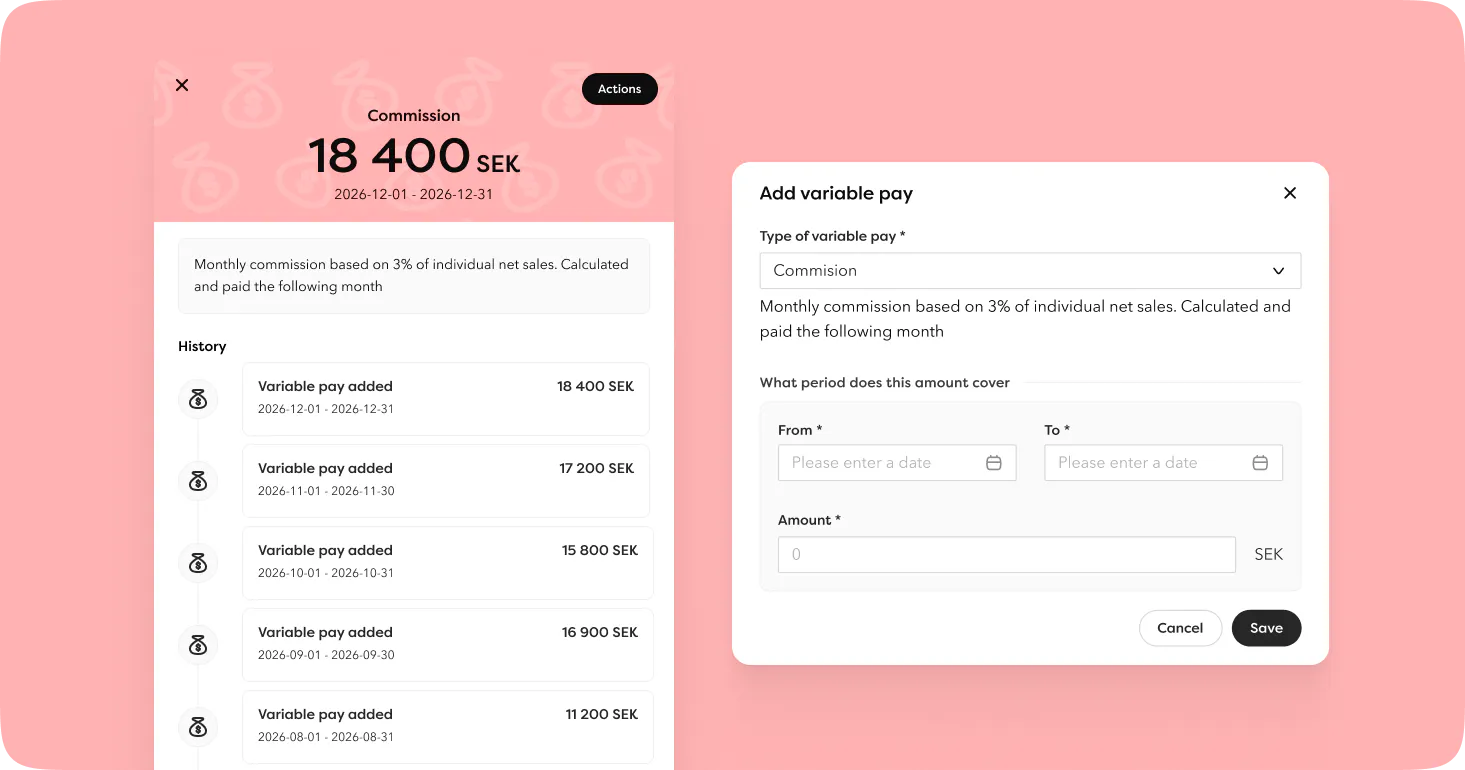
Variable pay is now fully in place. Salary types with variable pay are managed under settings, and users with the right access can add, view and remove amounts directly on the employee profile. All amounts of the same type are automatically grouped into one card so the overview is always clear. The most recent amount is highlighted, and expanding the card shows the full history.
Amounts can also be imported via the employee list, which is handy when you need to register things like monthly commissions for multiple employees at once. A variable pay type that has registered amounts cannot be deleted, ensuring the history is always kept.
There is also a dedicated report where you select a date range and get a list of all amounts whose periods overlap. Simple and to the point.
Full-time salary and actual salary
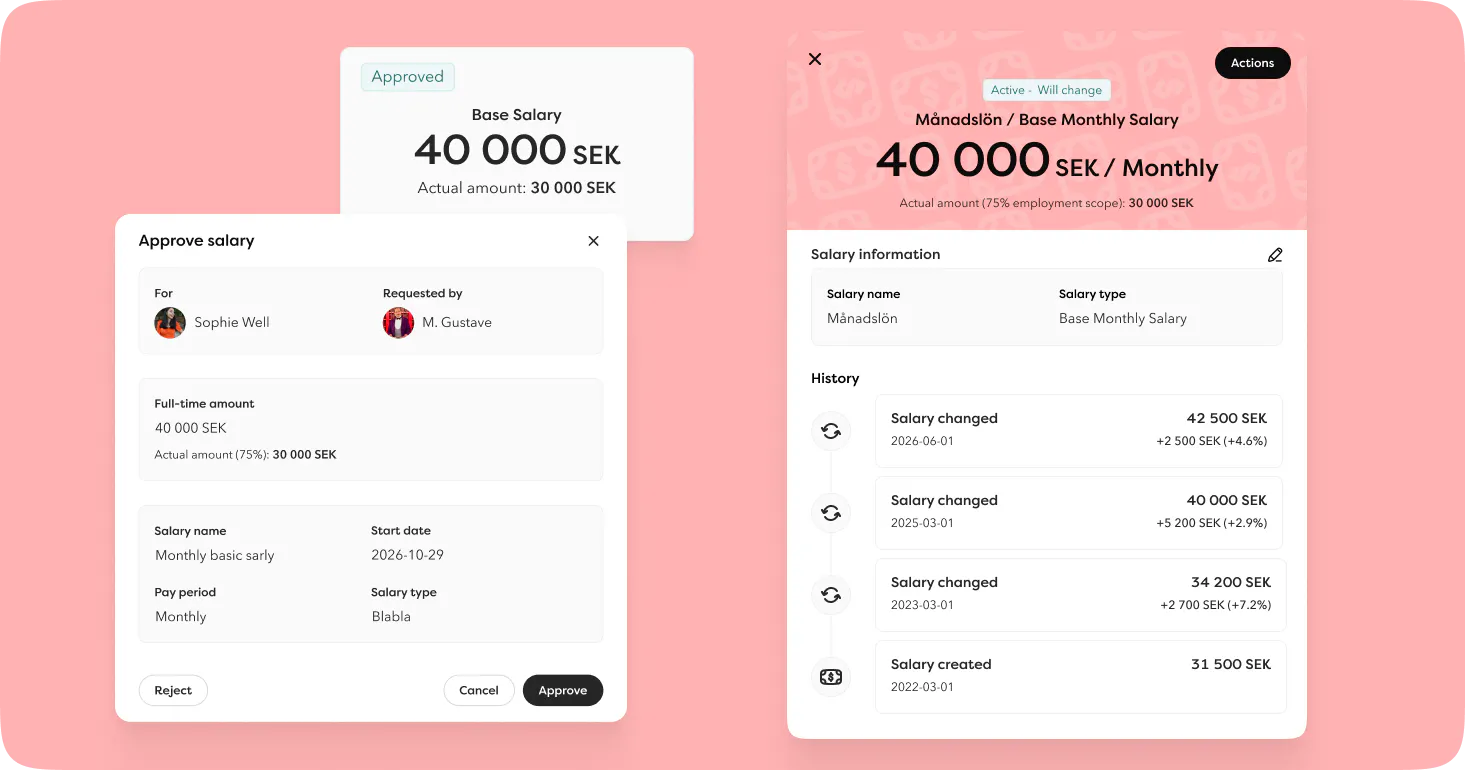
For those with part-time employees, there is now an easy way to see what the salary actually comes to once their hours are taken into account.
You can enable actual salary calculation directly on a salary type. The actual salary is automatically calculated based on the full-time salary and the employee's scope (%) and is shown when adding or changing salary, in approval tasks and on the employee card.
New columns for full-time amount and actual amount have also been added to the salary report and salary change report.
Will be released in the next couple of days
Time Off and Time
Auto-approved time off reasons
Some time off reasons simply do not need to go through an approval flow. You can now set selected time off reasons to be auto-approved straight away, including long-term leave. The approver does not need to take any action, but they will receive an email to keep them informed.
The reporting policy controls which time off reasons are auto-approved.
More flexible approval principles
Approval principles for time and time off have moved from Security to Reporting Policy.
You can now set up different approvers for different parts of the organisation. One department can have the manager as approver while another has the team lead. Everything is now managed directly from the reporting policy.
Two new types of primary approvers have also been added: task force and manager's manager. A task force can now also be selected as a fallback approver, giving even more flexibility when the primary approver is not available.
Simpler time reporting
We have removed the step where employees had to manually submit their reported time. Time now automatically enters a pending approval status when it is reported, which is one less thing to think about. There are now just two statuses: Pending approval and Approved.
Employees with permission to view their own time can also delete time that has not yet been approved.
Skills
Competences: Better rating capabilities
We have taken competences a step further. Here is what is new when it comes to tracking and understanding employee development:
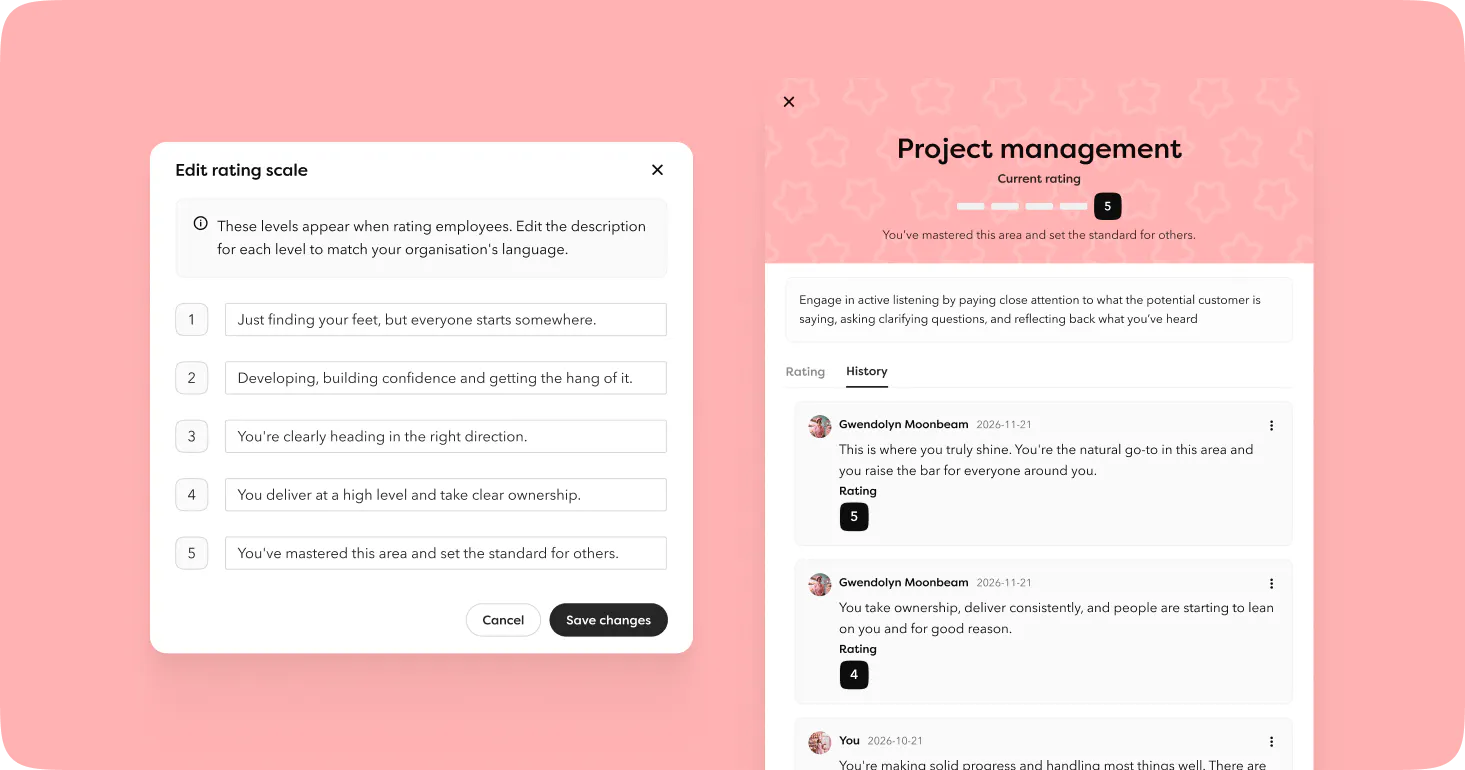
- Rating level descriptions can now be freely customised. Default descriptions are pre-filled but can be edited to make the rating scale more meaningful and tailored to your organisation.
- You can now add a comment when rating a competence, making it easier to understand the context behind a rating after the fact.
- A new modal on the employee card gives a complete picture of the competence and its history, making it easy to follow how the rating has developed over time.
- A target rating between 1 and 5 can be set per competence, displayed in the overview next to the actual rating so it is always clear where the employee stands relative to the goal.
Certifications: Better control over expiring certifications
You can now link a task force to be notified when a certification it is about to expire, ensuring the right people are always informed well in advance.
You can also add certifications to employees even if they are not required based on their organisational belonging. This can be useful when an individual employee needs a certification that is only required for a different department. Renewal tasks are not sent out for such additions.
Other
Seats overview: From April 2026, you can view the billing basis directly in Hailey, provided the invoice has been created. The feature is available for admins under the profile menu and shows an overview with the option to click into a specific invoice and filter by legal entity.
Accessibility: The public pages for whistleblowing and recruitment (career page and job ads) now meet WCAG 2.2 standards. This includes support for keyboard navigation, screen readers, correct contrast ratios and sufficiently large clickable areas.
Audit log: The audit log has been improved to handle large volumes of data more efficiently. The filters for Created by and Affected employee are now searchable. Events related to recruitment are cleared when an application, reference or recruitment is deleted, so that sensitive data is not retained in the log.
MCP: User login: All employees in an organisation can now connect to Hailey MCP in their own AI tool. The employee authenticates by logging in via Hailey and only gets access to the data in MCP that they have permission to see in Hailey.
Report for contracted periods in casual employment: A new report for contracted periods is now available. Select a date range and all contracted periods that overlap will be listed. Available for export.
Integrations
Okta & Entra ID: You can now add multiple integrations and scope them by legal entity and workplace. This means you can choose to sync different data to the same Okta or Entra account depending on which part of the organisation it applies to. For example, you might want to sync everything for office employees, while for warehouse staff you only want to create accounts without syncing department or similar details. You can also sync employees to entirely different Okta or Entra accounts, or simply test an integration on a smaller part of the organisation. Okta integrations can also be deactivated and deleted.
Kleer: Support has been added for scoping by legal entity and workplace, as well as the ability to add multiple integrations. You can now also activate, deactivate and delete the integration.
Fortnox: Customers can now choose to sync cost centres to Fortnox. The cost centre code in Hailey and in Fortnox must match for the sync to work.
Kontek: You can now create employees in Kontek using different input templates. To use different templates, the user needs to create a custom employment field, configure it for the integration, and the employee must have the field filled in to be created with the correct template. Support has also been added for customers running payroll externally, as previously the integration only worked for those running it internally.
New partner integrations
More platforms are building integrations to Hailey, giving you even more ready-to-use solutions for syncing master data from Hailey to other systems. New this month:
Entré (Hantverksdata by Aceve):
- Employee data: employment number, name, personal identity number, address, phone, email, start date and end date.
- Pay data: pay rate name, from date, to date and amount.
Payap has expanded its integration and added synchronisation of:
- Time off
- Workplace